> ## Documentation Index
> Fetch the complete documentation index at: https://docs.binarly.io/llms.txt
> Use this file to discover all available pages before exploring further.
# Filtering findings by reachability
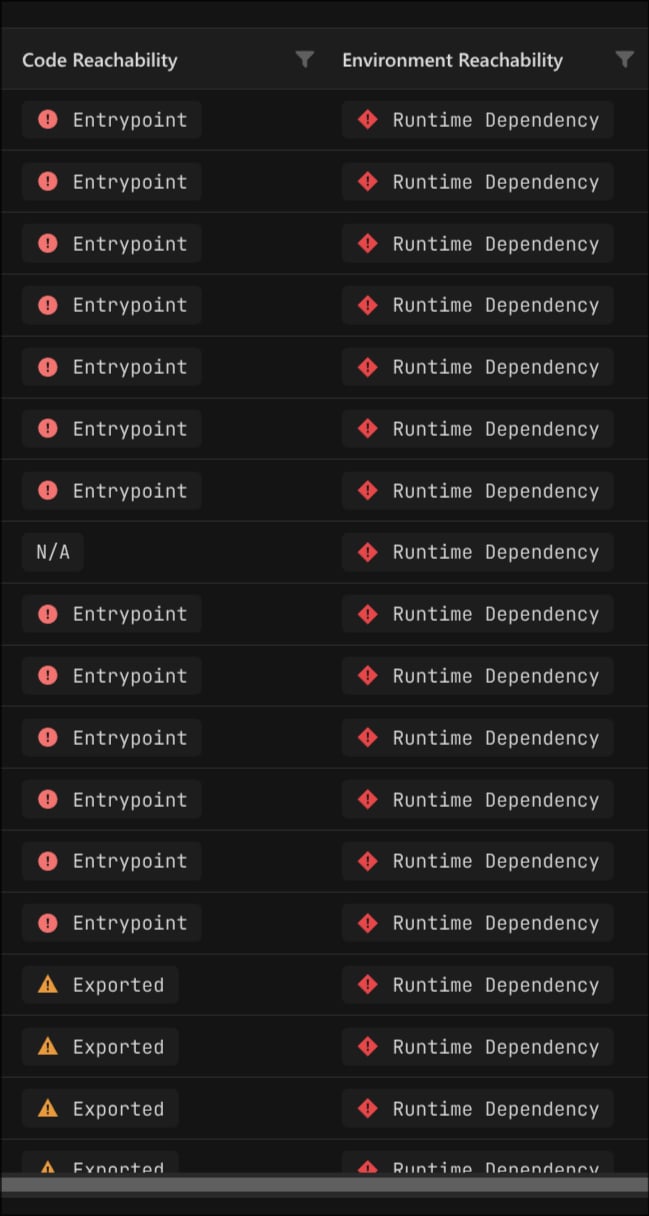
> Read the Code Reachability and Environment Reachability columns together to scope the Findings grid to vulnerabilities whose code both loads in the deployment and is reachable inside its binary.
The Findings grid reports reachability in two columns: Code Reachability and Environment Reachability. Read together, they tell you whether a vulnerable component's code is actually executed in the deployed package. Code Reachability answers whether the vulnerable code is reachable inside its own binary. Environment Reachability answers whether that component runs or loads in the assumed runtime environment. Both come from [Attack Surface Approximation and Prioritisation (ASAP)](/resource-center/asap), and each column has its own filter.
 ## Prerequisites
* A completed image scan with findings.
* Access to the Findings grid for the image or product.
## The two reachability columns
Each column answers a different question. Environment Reachability asks whether the component runs at all in the package. Code Reachability asks whether, once it runs, execution can reach the vulnerable code. Neither answer alone confirms that the vulnerable code runs; the combination does.
### Code Reachability
Whether the vulnerable code is reachable from an entry-point inside the component that contains it.
| Value | Meaning |
| ---------------- | ----------------------------------------------------------------------------------------------------------------------------------------------------------------------------------------------------- |
| **Entrypoint** | A path exists from the component's original entry-point, such as `main` or `start`, to the vulnerable location. Strongest in-binary signal. |
| **Exported** | Reachable from a viable exported entry-point. For shared libraries this is an exported function. For UEFI it covers identified SMI handlers and functions in registered protocol interfaces and PPIs. |
| **Referenced** | Referenced by reachable code, but a static path could not be confirmed. |
| **Undetermined** | There is analysable code, but its reachability could not be determined statically. |
| **N/A** | There is no analysable code for the finding, so code reachability does not apply. |
## Prerequisites
* A completed image scan with findings.
* Access to the Findings grid for the image or product.
## The two reachability columns
Each column answers a different question. Environment Reachability asks whether the component runs at all in the package. Code Reachability asks whether, once it runs, execution can reach the vulnerable code. Neither answer alone confirms that the vulnerable code runs; the combination does.
### Code Reachability
Whether the vulnerable code is reachable from an entry-point inside the component that contains it.
| Value | Meaning |
| ---------------- | ----------------------------------------------------------------------------------------------------------------------------------------------------------------------------------------------------- |
| **Entrypoint** | A path exists from the component's original entry-point, such as `main` or `start`, to the vulnerable location. Strongest in-binary signal. |
| **Exported** | Reachable from a viable exported entry-point. For shared libraries this is an exported function. For UEFI it covers identified SMI handlers and functions in registered protocol interfaces and PPIs. |
| **Referenced** | Referenced by reachable code, but a static path could not be confirmed. |
| **Undetermined** | There is analysable code, but its reachability could not be determined statically. |
| **N/A** | There is no analysable code for the finding, so code reachability does not apply. |
 ### Environment Reachability
Whether the component runs or loads in the package's assumed runtime environment.
| Value | Meaning |
| ---------------------- | ------------------------------------------------------------------------------------------------------------------------------------------ |
| **Entrypoint** | Reachable from the environment's advertised entry-point, such as a container's entrypoint. The component runs. |
| **Runtime Invocation** | Another running component may invoke it at runtime. The component likely runs. |
| **Runtime Dependency** | Another component loads it as a dependency, for example through dynamic linking. The component is loaded, but the code may not be invoked. |
| **Undetermined** | Reachability could not be determined, or the component is outside the assumed attack surface. |
### Environment Reachability
Whether the component runs or loads in the package's assumed runtime environment.
| Value | Meaning |
| ---------------------- | ------------------------------------------------------------------------------------------------------------------------------------------ |
| **Entrypoint** | Reachable from the environment's advertised entry-point, such as a container's entrypoint. The component runs. |
| **Runtime Invocation** | Another running component may invoke it at runtime. The component likely runs. |
| **Runtime Dependency** | Another component loads it as a dependency, for example through dynamic linking. The component is loaded, but the code may not be invoked. |
| **Undetermined** | Reachability could not be determined, or the component is outside the assumed attack surface. |
 ## How reachability differs by ecosystem
The same column value is derived differently depending on the package. Code Reachability depends on what counts as an entry-point inside a binary, and Environment Reachability depends on how the package declares what runs. The Ecosystem column is the kind of package you uploaded; the Environment class is the label ASAP assigns once it identifies that package. Use this table to read the columns in the right context. See [Reachability analysis (ASAP)](/resource-center/asap) for the full model.
| Ecosystem | Environment class | How the platform decides what runs | Code entry-points inside a component |
| ----------------------------------------- | ------------------------------------------------- | ---------------------------------------------------- | ------------------------------------------------------------------------------------------------------------------------------------------ |
| Container | Container | OCI image config: `Entrypoint`, `Cmd`, and `Env` | ELF executables (`main` or `start`) and shared-library exports |
| Linux (system image, Linux-like firmware) | System image, or Undetermined for BMC-like images | Start-up scripts, such as those under `/etc/init.d/` | ELF executables (`main` or `start`) and shared-library exports |
| UEFI (system firmware) | System firmware | Modules present in the firmware image structure | Module protocol interfaces, PPIs, registered event handlers, and identified SMI handlers; ISRs for firmware with an Interrupt Vector Table |
Reading this in practice, take each column in turn:
* **Code Reachability** reads the same on containers and Linux images, because both hold ELF binaries: `main` or `start` gives Entrypoint, and shared-library exports give Exported. UEFI has no `main`-style entry, so its reachable code is almost always Exported, entered through protocol interfaces, PPIs, registered event handlers, and SMI handlers.
* **Environment Reachability** starts from how each package declares what runs: containers from the OCI config, Linux images from start-up scripts, UEFI from the modules in the firmware image. Across all three, a component that runs shows Entrypoint, one component invoking another shows Runtime Invocation, and a loaded but possibly unused dependency shows Runtime Dependency. Runtime Dependency comes from dynamic linking, so it appears on containers and Linux, and rarely on UEFI, where modules interact through protocols and PPIs and show Runtime Invocation instead.
On UEFI findings, Exported is the strong Code Reachability signal, not a weaker one. Do not deprioritise a UEFI finding only because it is not marked Entrypoint. A module's reachable code is entered through its protocol interfaces, PPIs, event handlers, and SMI handlers, which the platform classifies as Exported.
## Reading the two columns together
Environment Reachability places the component on the attack surface. Code Reachability confirms the vulnerable path inside it. A finding is most likely to be executed when both signals are strong. This pairing holds for every ecosystem, but which values you actually see depends on it: on UEFI, the strong Code Reachability signal is Exported rather than Entrypoint, as covered in [How reachability differs by ecosystem](#how-reachability-differs-by-ecosystem). Read the pair against this table:
| Environment Reachability | Code Reachability | What it means |
| -------------------------------- | -------------------------------- | ---------------------------------------------------------------------------------------------------------------------------------------------------- |
| Entrypoint or Runtime Invocation | Entrypoint or Exported | The component runs and the vulnerable code is reachable inside it. On the attack surface, highest priority. |
| Entrypoint or Runtime Invocation | Referenced, Undetermined, or N/A | The component runs, but the vulnerable path inside it is not confirmed. Weigh with severity and exploitability. |
| Runtime Dependency | Any | The component is loaded as a dependency but may never be invoked. Check whether the depending component calls the vulnerable function before acting. |
| Undetermined | Any | The component was not placed on the assumed attack surface. Deprioritise, and revisit if your deployment differs from the assumed environment. |
Undetermined means there is code but its reachability could not be confirmed statically. N/A means there is no analysable code for the finding. Neither proves the code never runs, so keep both for a second pass rather than discarding them.
## Filter the grid by reachability
Each column has its own filter in the grid header.
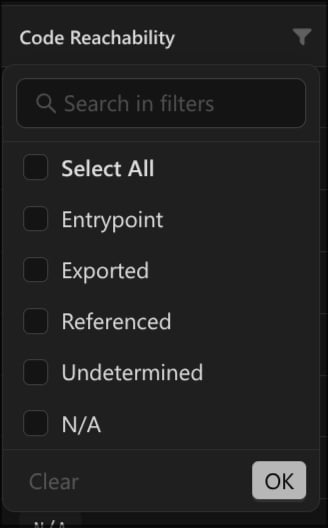
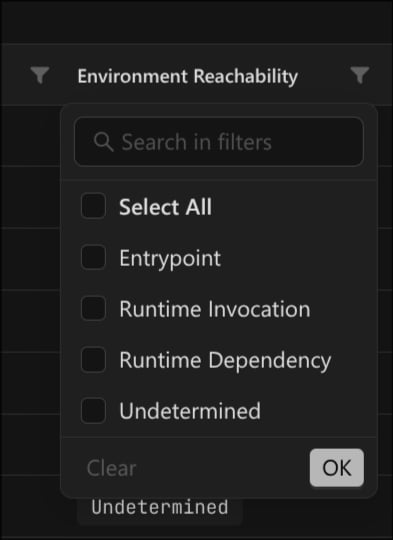
Click the funnel icon in the Code Reachability or Environment Reachability column header.
Tick the values you want to see. Use Search in filters to find a value, or Select All to start from everything. A finding matches when its value is in your selection.
Click OK to apply, or Clear to reset the column. The grid updates and writes the filter state to the page URL, so you can bookmark or share it.
Filter Environment Reachability and Code Reachability together to scope to findings that both run and are reachable in-binary.
## Example: reachable, open known vulnerabilities
Build a triage view for known vulnerabilities that are most likely executed and still open:
* **Type** is Known Vulnerability.
* **Environment Reachability** is Entrypoint or Runtime Invocation.
* **Code Reachability** is Entrypoint or Exported.
* **Status** is New or In Progress, with **Ignored** off.
Sort by Risk Score, highest first. Reachability already feeds risk scoring, so reachable findings sort toward the top. To widen the net for a second pass, add Runtime Dependency and Referenced, then work down from there.
This answers the ASAP question directly: of the known vulnerabilities present, which sit on code that runs and is reachable inside its binary. It is a strong default for a triage queue.
## On the finding detail
Open a finding to see both signals in full.
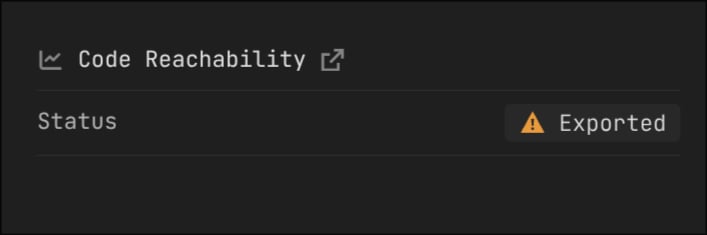
* Code Reachability shows the Status and links to the reachability trace evidence.
* Environment Reachability shows the Environment it was derived from, the Reachability kind, and the components the reachability comes from under **from Component(s)**, each with its path.
When a component is reachable from more than one other component, the Environment Reachability cell shows a count, such as `2 ER`, and the detail lists each source under **from Component(s)**. Check each component listed there to see whether it calls the vulnerable function.
## How reachability differs by ecosystem
The same column value is derived differently depending on the package. Code Reachability depends on what counts as an entry-point inside a binary, and Environment Reachability depends on how the package declares what runs. The Ecosystem column is the kind of package you uploaded; the Environment class is the label ASAP assigns once it identifies that package. Use this table to read the columns in the right context. See [Reachability analysis (ASAP)](/resource-center/asap) for the full model.
| Ecosystem | Environment class | How the platform decides what runs | Code entry-points inside a component |
| ----------------------------------------- | ------------------------------------------------- | ---------------------------------------------------- | ------------------------------------------------------------------------------------------------------------------------------------------ |
| Container | Container | OCI image config: `Entrypoint`, `Cmd`, and `Env` | ELF executables (`main` or `start`) and shared-library exports |
| Linux (system image, Linux-like firmware) | System image, or Undetermined for BMC-like images | Start-up scripts, such as those under `/etc/init.d/` | ELF executables (`main` or `start`) and shared-library exports |
| UEFI (system firmware) | System firmware | Modules present in the firmware image structure | Module protocol interfaces, PPIs, registered event handlers, and identified SMI handlers; ISRs for firmware with an Interrupt Vector Table |
Reading this in practice, take each column in turn:
* **Code Reachability** reads the same on containers and Linux images, because both hold ELF binaries: `main` or `start` gives Entrypoint, and shared-library exports give Exported. UEFI has no `main`-style entry, so its reachable code is almost always Exported, entered through protocol interfaces, PPIs, registered event handlers, and SMI handlers.
* **Environment Reachability** starts from how each package declares what runs: containers from the OCI config, Linux images from start-up scripts, UEFI from the modules in the firmware image. Across all three, a component that runs shows Entrypoint, one component invoking another shows Runtime Invocation, and a loaded but possibly unused dependency shows Runtime Dependency. Runtime Dependency comes from dynamic linking, so it appears on containers and Linux, and rarely on UEFI, where modules interact through protocols and PPIs and show Runtime Invocation instead.
On UEFI findings, Exported is the strong Code Reachability signal, not a weaker one. Do not deprioritise a UEFI finding only because it is not marked Entrypoint. A module's reachable code is entered through its protocol interfaces, PPIs, event handlers, and SMI handlers, which the platform classifies as Exported.
## Reading the two columns together
Environment Reachability places the component on the attack surface. Code Reachability confirms the vulnerable path inside it. A finding is most likely to be executed when both signals are strong. This pairing holds for every ecosystem, but which values you actually see depends on it: on UEFI, the strong Code Reachability signal is Exported rather than Entrypoint, as covered in [How reachability differs by ecosystem](#how-reachability-differs-by-ecosystem). Read the pair against this table:
| Environment Reachability | Code Reachability | What it means |
| -------------------------------- | -------------------------------- | ---------------------------------------------------------------------------------------------------------------------------------------------------- |
| Entrypoint or Runtime Invocation | Entrypoint or Exported | The component runs and the vulnerable code is reachable inside it. On the attack surface, highest priority. |
| Entrypoint or Runtime Invocation | Referenced, Undetermined, or N/A | The component runs, but the vulnerable path inside it is not confirmed. Weigh with severity and exploitability. |
| Runtime Dependency | Any | The component is loaded as a dependency but may never be invoked. Check whether the depending component calls the vulnerable function before acting. |
| Undetermined | Any | The component was not placed on the assumed attack surface. Deprioritise, and revisit if your deployment differs from the assumed environment. |
Undetermined means there is code but its reachability could not be confirmed statically. N/A means there is no analysable code for the finding. Neither proves the code never runs, so keep both for a second pass rather than discarding them.
## Filter the grid by reachability
Each column has its own filter in the grid header.
Click the funnel icon in the Code Reachability or Environment Reachability column header.
Tick the values you want to see. Use Search in filters to find a value, or Select All to start from everything. A finding matches when its value is in your selection.
Click OK to apply, or Clear to reset the column. The grid updates and writes the filter state to the page URL, so you can bookmark or share it.
Filter Environment Reachability and Code Reachability together to scope to findings that both run and are reachable in-binary.
## Example: reachable, open known vulnerabilities
Build a triage view for known vulnerabilities that are most likely executed and still open:
* **Type** is Known Vulnerability.
* **Environment Reachability** is Entrypoint or Runtime Invocation.
* **Code Reachability** is Entrypoint or Exported.
* **Status** is New or In Progress, with **Ignored** off.
Sort by Risk Score, highest first. Reachability already feeds risk scoring, so reachable findings sort toward the top. To widen the net for a second pass, add Runtime Dependency and Referenced, then work down from there.
This answers the ASAP question directly: of the known vulnerabilities present, which sit on code that runs and is reachable inside its binary. It is a strong default for a triage queue.
## On the finding detail
Open a finding to see both signals in full.
* Code Reachability shows the Status and links to the reachability trace evidence.
* Environment Reachability shows the Environment it was derived from, the Reachability kind, and the components the reachability comes from under **from Component(s)**, each with its path.
When a component is reachable from more than one other component, the Environment Reachability cell shows a count, such as `2 ER`, and the detail lists each source under **from Component(s)**. Check each component listed there to see whether it calls the vulnerable function.
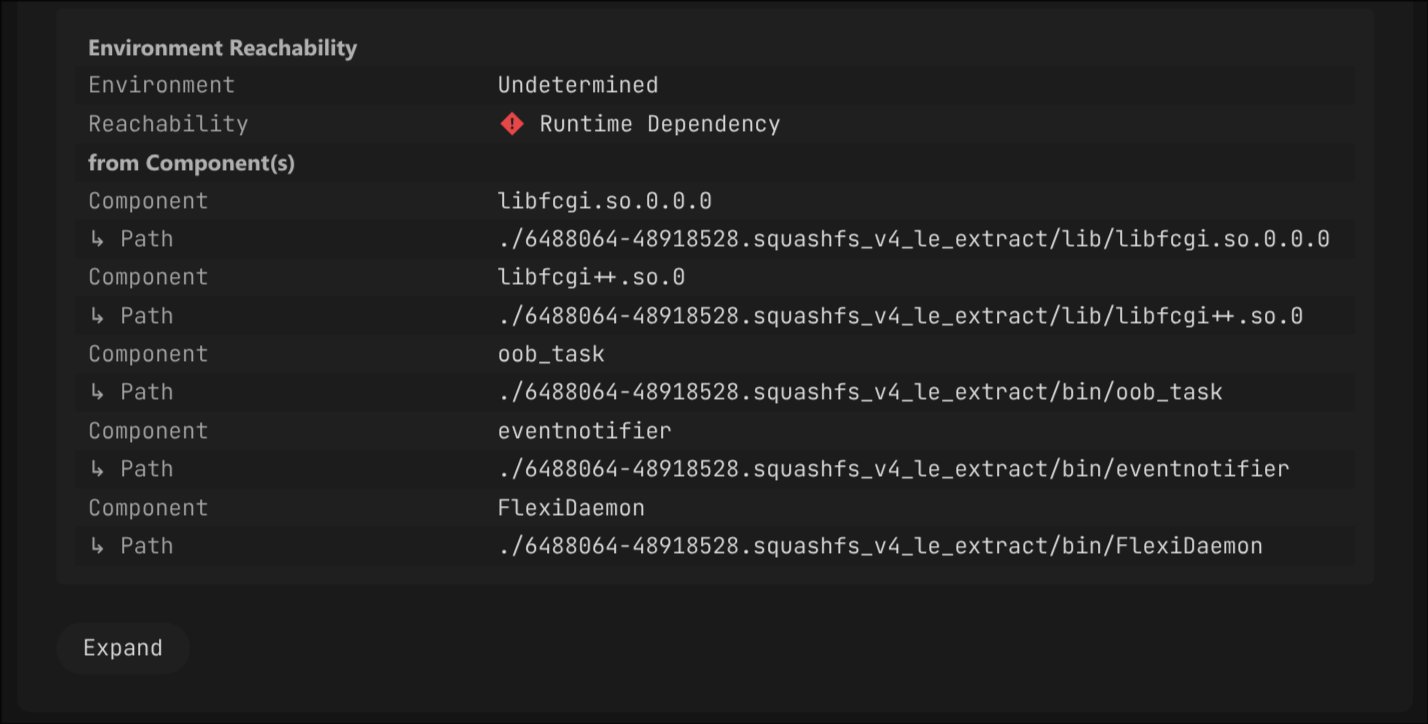 Each property changes how much weight the reachability carries:
| Property | Column | Impact on the execution judgement |
| --------------------- | ------------------------ | ---------------------------------------------------------------------------------------------------------------------------------------------------------------------------------------------------------------------------------------------------------------------------------------------------------------------------------- |
| **Status** | Code Reachability | The in-binary class. Entrypoint and Exported put the vulnerable code on a reachable path; Referenced and Undetermined do not confirm it. |
| **Environment** | Environment Reachability | The environment class ASAP detected: Container, System image, System firmware, or Undetermined. A precise class means the runtime seeds are well defined. Undetermined means the environment could not be pinned down, for example a BMC image that resembles a generic Linux image, so treat its reachability as weaker evidence. |
| **Reachability** | Environment Reachability | The reachability kind that decides whether the component runs or is only loaded. |
| **from Component(s)** | Environment Reachability | The referent components that invoke or depend on this one, each with its path. |
## Save and share the view
Once the filters and sorting are set, keep the view for reuse:
* Save the filter, sort, and column settings as a [Saved View](/user-guides/important-findings/saved-views). Saved Views are scoped to the grid category (Global, Product Image, and so on).
* Copy the page URL to hand a teammate the same view. The grid encodes filters, sorting, and page state in the URL.
## Related
How Binarly computes the Code and Environment Reachability behind these filters.
Save and reuse filtered, sorted grid views.
Where reachability appears on an individual finding.
Filter findings by CVSS vector components.
Each property changes how much weight the reachability carries:
| Property | Column | Impact on the execution judgement |
| --------------------- | ------------------------ | ---------------------------------------------------------------------------------------------------------------------------------------------------------------------------------------------------------------------------------------------------------------------------------------------------------------------------------- |
| **Status** | Code Reachability | The in-binary class. Entrypoint and Exported put the vulnerable code on a reachable path; Referenced and Undetermined do not confirm it. |
| **Environment** | Environment Reachability | The environment class ASAP detected: Container, System image, System firmware, or Undetermined. A precise class means the runtime seeds are well defined. Undetermined means the environment could not be pinned down, for example a BMC image that resembles a generic Linux image, so treat its reachability as weaker evidence. |
| **Reachability** | Environment Reachability | The reachability kind that decides whether the component runs or is only loaded. |
| **from Component(s)** | Environment Reachability | The referent components that invoke or depend on this one, each with its path. |
## Save and share the view
Once the filters and sorting are set, keep the view for reuse:
* Save the filter, sort, and column settings as a [Saved View](/user-guides/important-findings/saved-views). Saved Views are scoped to the grid category (Global, Product Image, and so on).
* Copy the page URL to hand a teammate the same view. The grid encodes filters, sorting, and page state in the URL.
## Related
How Binarly computes the Code and Environment Reachability behind these filters.
Save and reuse filtered, sorted grid views.
Where reachability appears on an individual finding.
Filter findings by CVSS vector components.